API 通道
API 通道将智能体的能力以 OpenAI Chat Completions 协议 对外提供服务,让任何已接入 OpenAI API 的应用只需改一行配置就能切换到 TpClaw 智能体。
核心优势:零改造接入
传统做法需要为每个 AI 应用单独开发对接逻辑,而 TpClaw 的 API 通道完全兼容 OpenAI 协议,意味着:
- 已有 OpenAI 应用:只需修改
base_url和api_key,即可将底层切换为 TpClaw 智能体,无需改任何业务代码 - 新应用开发:直接使用熟悉的 OpenAI SDK 调用,学习成本为零
- 多语言支持:Python、JavaScript、Go、Java 等所有 OpenAI SDK 都能直接使用
python
# 只需改两行,就能从 OpenAI 切换到 TpClaw 智能体
import openai

client = openai.OpenAI(
    api_key="your-tpclaw-api-key",           # 改为 TpClaw 的 API Key
    base_url="http://localhost:9527/api/v1"   # 改为 TpClaw 的地址
)
# 其他代码完全不变
response = client.chat.completions.create(
    model="main",
    messages=[{"role": "user", "content": "你好"}]
)
概述
API 通道提供了一种标准化的方式,让外部系统可以通过 API Key 认证调用智能体。适用于:
- 将现有 AI 应用快速迁移到 TpClaw
- 第三方系统集成
- Web / 移动应用后端
- 自动化脚本和定时任务
配置
界面配置
点击左侧菜单「设置」→ 选择「通道配置」标签页,找到 API 通道进行配置。
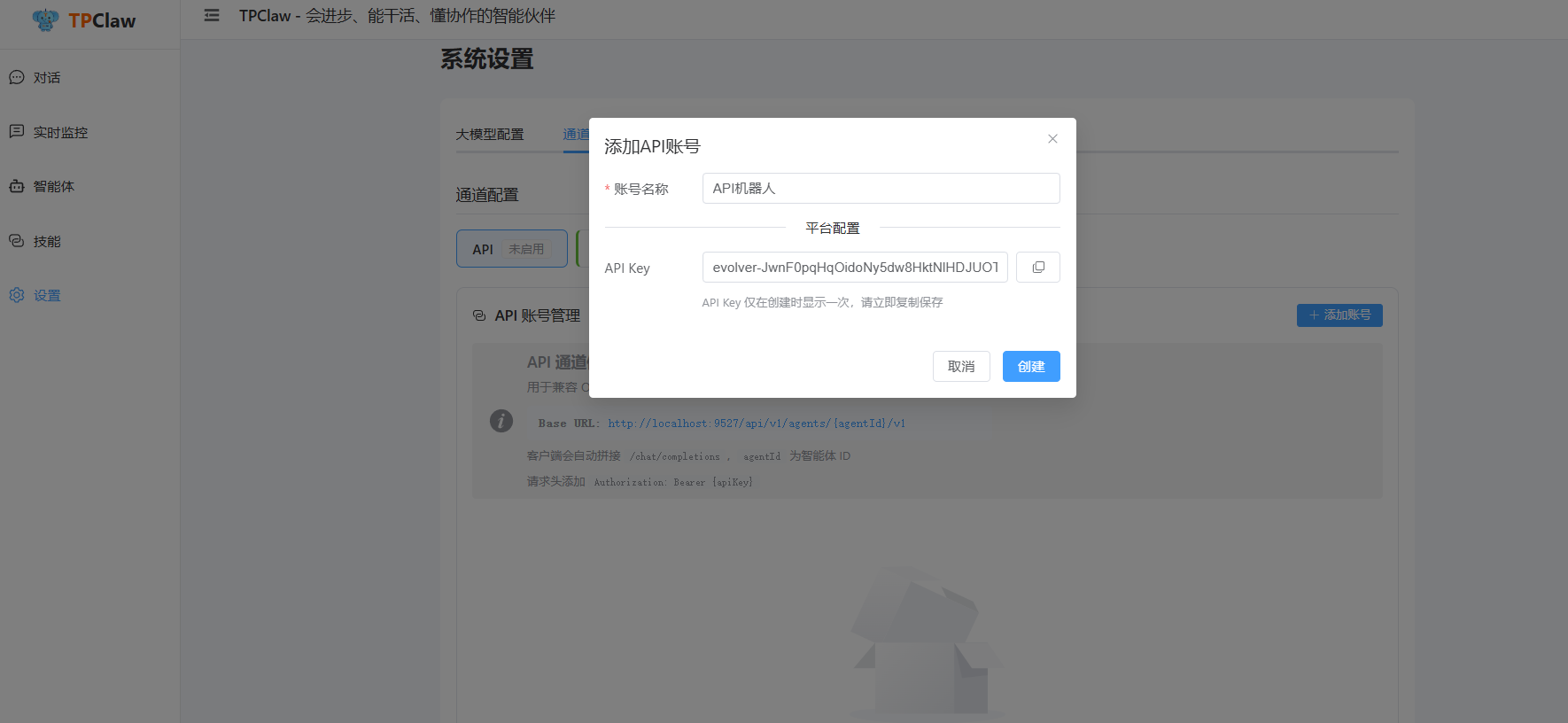
在 API 通道设置页面可以:
- 查看和添加 API 账户
- 为每个账户生成独立的 API Key
- 配置账户名称和描述
YAML 配置
yaml
channels:
  api:
    enabled: true
    accounts:
      account01:
        name: "外部系统"
        enabled: true
        api_key: "your-api-key"
        dm_policy: "allow"           # 私聊策略
        group_policy: "allow"        # 群聊策略
多账号配置
yaml
channels:
  api:
    enabled: true
    accounts:
      # 管理员账号
      admin:
        name: "管理员"
        enabled: true
        api_key: "admin-secret-key"
        dm_policy: "allow"
        group_policy: "allow"

      # 只读账号
      readonly:
        name: "只读用户"
        enabled: true
        api_key: "readonly-key"
        dm_policy: "allow"
        group_policy: "disabled"
使用方式
Chat API(OpenAI 兼容)
API 通道支持 OpenAI 兼容的 Chat Completions API:
bash
curl -X POST http://localhost:9527/api/v1/chat/completions \
  -H "Authorization: Bearer your-api-key" \
  -H "Content-Type: application/json" \
  -d '{
    "model": "main",
    "messages": [
      {"role": "user", "content": "你好"}
    ],
    "stream": true
  }'
参数说明:
| 参数 | 类型 | 说明 |
|---|---|---|
model | string | 智能体 ID |
messages | array | 消息列表 |
stream | bool | 是否流式输出 |
sessionId | string | 会话 ID(可选) |
非流式响应
json
{
  "id": "chatcmpl-xxx",
  "object": "chat.completion",
  "created": 1234567890,
  "model": "main",
  "choices": [
    {
      "index": 0,
      "message": {
        "role": "assistant",
        "content": "你好!有什么可以帮助你的?"
      },
      "finish_reason": "stop"
    }
  ]
}
流式响应
data: {"id":"chatcmpl-xxx","choices":[{"delta":{"content":"你好"},"finish_reason":null}]}

data: {"id":"chatcmpl-xxx","choices":[{"delta":{"content":"!"},"finish_reason":null}]}

data: {"id":"chatcmpl-xxx","choices":[{"delta":{"content":""},"finish_reason":"stop"}]}

data: [DONE]
工具调用过程(AG-UI 扩展)
智能体在服务端自主执行工具。默认流式响应只返回最终文本、不下发 tool_calls——因为 tool_calls 在 OpenAI 协议里表示"由客户端执行",下发会让 Cherry Studio、Claude Code 等标准客户端去执行服务端已经执行过的工具,造成重复执行或报错。这是第三方接入的默认行为,无需额外配置。
若客户端需要流式展示完整的工具调用过程(调用、参数、结果),在请求头带 X-Stream-Protocol: agui 启用 AG-UI 扩展模式:
bash
curl -X POST http://localhost:9527/api/v1/chat/completions \
  -H "Authorization: Bearer your-api-key" \
  -H "Content-Type: application/json" \
  -H "X-Stream-Protocol: agui" \
  -d '{
    "model": "main",
    "messages": [{"role": "user", "content": "帮我查看当前目录文件"}],
    "stream": true
  }'
扩展模式下,工具调用事件放在 choices[0].delta.tool_calls[0] 中:
| 字段 | 说明 |
|---|---|
type | TOOL_CALL_START(开始)/ TOOL_CALL_RESULT(结果) |
toolCallId | 工具调用唯一 ID |
toolCallName | 工具名称 |
arguments | 工具参数(JSON 字符串,START 时携带) |
content | 工具执行结果(RESULT 时携带) |
toolType | 工具类型:builtin / rulechain / subagent / mcp |
TpClaw 自带 Web 界面默认启用该扩展,实时展示工具调用卡片。
绑定配置
API 通道的绑定配置:
yaml
bindings:
  - agent_id: "main"
    match:
      default: true
      channel: "api"
      account_id: "account01"
会话管理
创建会话
通过 sessionId 参数管理会话:
bash
# 第一次请求
curl -X POST http://localhost:9527/api/v1/chat/completions \
  -H "Authorization: Bearer your-api-key" \
  -H "Content-Type: application/json" \
  -d '{
    "model": "main",
    "messages": [{"role": "user", "content": "我叫张三"}],
    "sessionId": "session-001"
  }'

# 后续请求(智能体会记住上下文)
curl -X POST http://localhost:9527/api/v1/chat/completions \
  -H "Authorization: Bearer your-api-key" \
  -H "Content-Type: application/json" \
  -d '{
    "model": "main",
    "messages": [{"role": "user", "content": "我叫什么名字?"}],
    "sessionId": "session-001"
  }'
清除会话
bash
POST /api/v1/sessions/clear
Content-Type: application/json

{
  "agentId": "main",
  "sessionKey": "session-001"
}
SDK 示例
Python
python
import openai

client = openai.OpenAI(
    api_key="your-api-key",
    base_url="http://localhost:9527/api/v1"
)

response = client.chat.completions.create(
    model="main",
    messages=[
        {"role": "user", "content": "你好"}
    ],
    stream=True
)

for chunk in response:
    print(chunk.choices[0].delta.content, end="")
JavaScript
javascript
import OpenAI from 'openai';

const client = new OpenAI({
  apiKey: 'your-api-key',
  baseURL: 'http://localhost:9527/api/v1',
});

const stream = await client.chat.completions.create({
  model: 'main',
  messages: [{ role: 'user', content: '你好' }],
  stream: true,
});

for await (const chunk of stream) {
  process.stdout.write(chunk.choices[0]?.delta?.content || '');
}
Go
go
package main

import (
    "context"
    "fmt"
    "github.com/sashabaranov/go-openai"
)

func main() {
    config := openai.DefaultConfig("your-api-key")
    config.BaseURL = "http://localhost:9527/api/v1"

    client := openai.NewClientWithConfig(config)

    stream, err := client.CreateChatCompletionStream(context.Background(), openai.ChatCompletionRequest{
        Model: "main",
        Messages: []openai.ChatCompletionMessage{
            {
                Role:    openai.ChatMessageRoleUser,
                Content: "你好",
            },
        },
        Stream: true,
    })
    if err != nil {
        panic(err)
    }
    defer stream.Close()

    for {
        response, err := stream.Recv()
        if err != nil {
            break
        }
        fmt.Print(response.Choices[0].Delta.Content)
    }
}
安全建议
API Key 管理
- 使用强密钥:生成足够长度的随机密钥
- 定期轮换:定期更换 API Key
- 权限分离:不同用途使用不同的账号
网络安全
- 使用 HTTPS:生产环境必须使用 HTTPS
- IP 白名单:限制允许访问的 IP
- 速率限制:配置请求频率限制
监控和日志
- 记录请求:记录 API 调用日志
- 异常告警:配置异常访问告警
- 定期审计:定期检查 API 使用情况