
大模型配置
配置 TpClaw 使用的 LLM 大模型供应商。支持所有兼容 OpenAI API 协议的供应商。
重要说明
- 主智能体使用默认供应商,添加供应商后需要将它设为默认才会生效
- 系统同一时间只能有一个默认供应商
- 每个供应商可以配置多个可用模型
配置步骤
进入大模型配置
点击左侧菜单「设置」→ 选择「大模型配置」标签页。
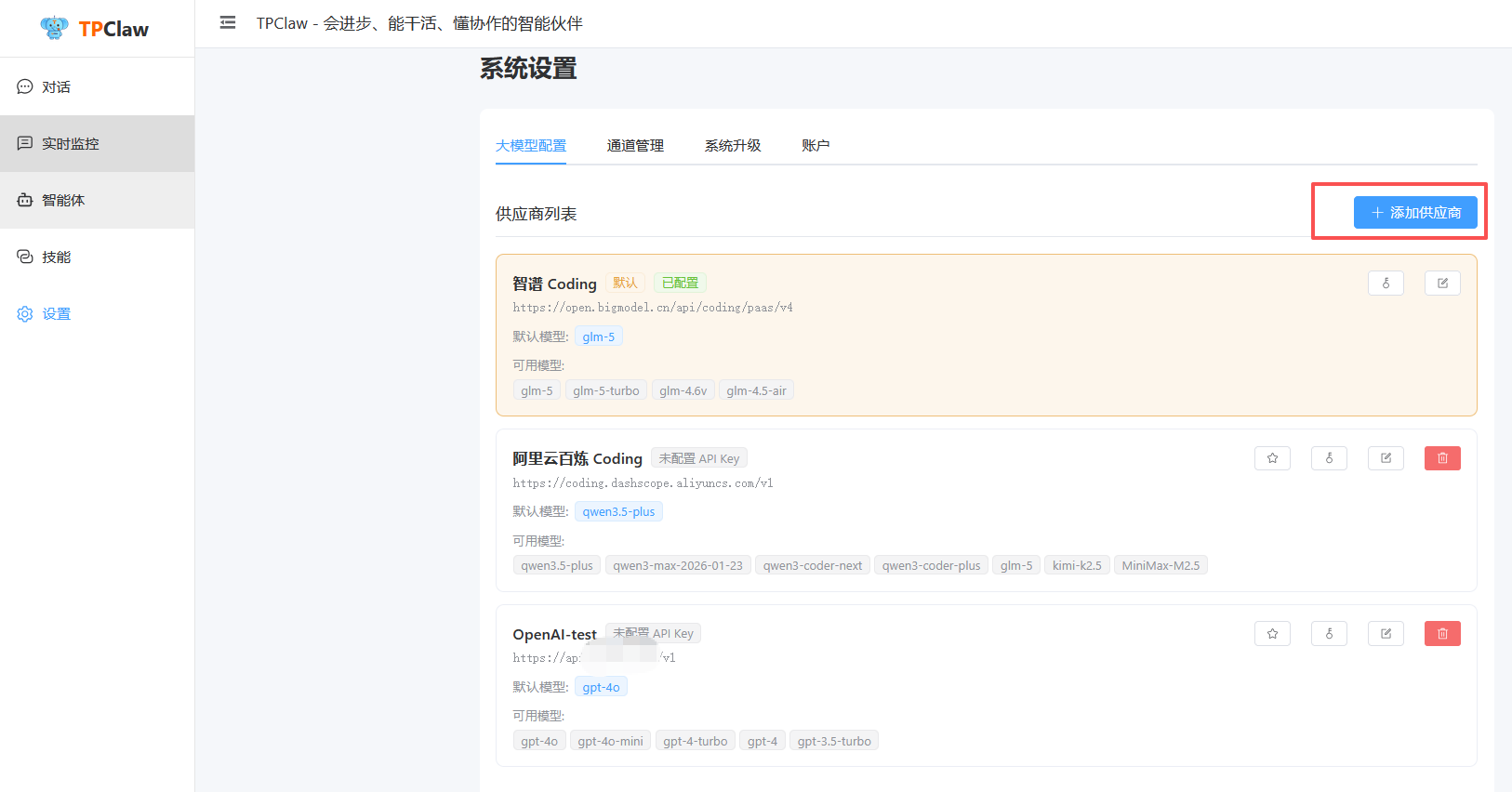
供应商列表页面展示所有已配置的供应商卡片,每个卡片显示:
- 供应商名称、Base URL、默认模型
- 状态标签:「默认」「已配置」「未配置 API Key」
- 可用模型列表和操作按钮(星标、编辑、删除)
添加供应商
点击右上角「+ 添加供应商」按钮:
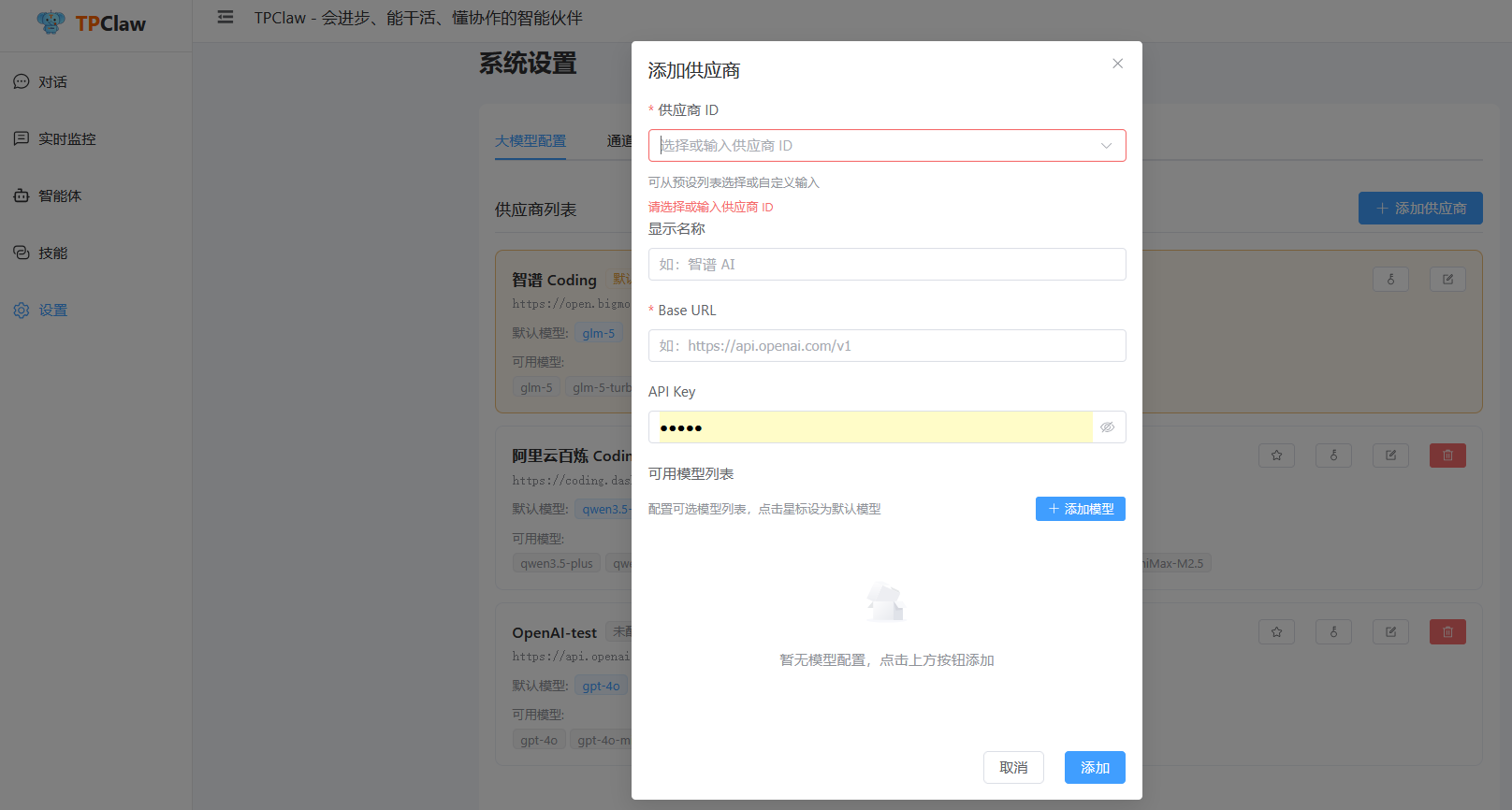
在弹出的对话框中填写:
| 字段 | 说明 |
|---|---|
| 供应商 ID | 从预设列表选择(如 openai、zhipu)或自定义输入,用于唯一标识 |
| 显示名称 | 供应商的显示名称,如「OpenAI」「智谱 AI」 |
| Base URL | API 接口地址,选择预设供应商会自动填充 |
| API Key | 该供应商的 API 密钥 |
| 可用模型 | 配置该供应商支持的模型列表,点击星标设为默认模型 |
选择预设供应商时,Base URL 会自动填充。也可以手动输入 Base URL 来接入任何兼容 OpenAI 协议的服务。
设置默认供应商
添加供应商后,点击供应商卡片上的星标按钮(⭐),将其设为默认供应商。
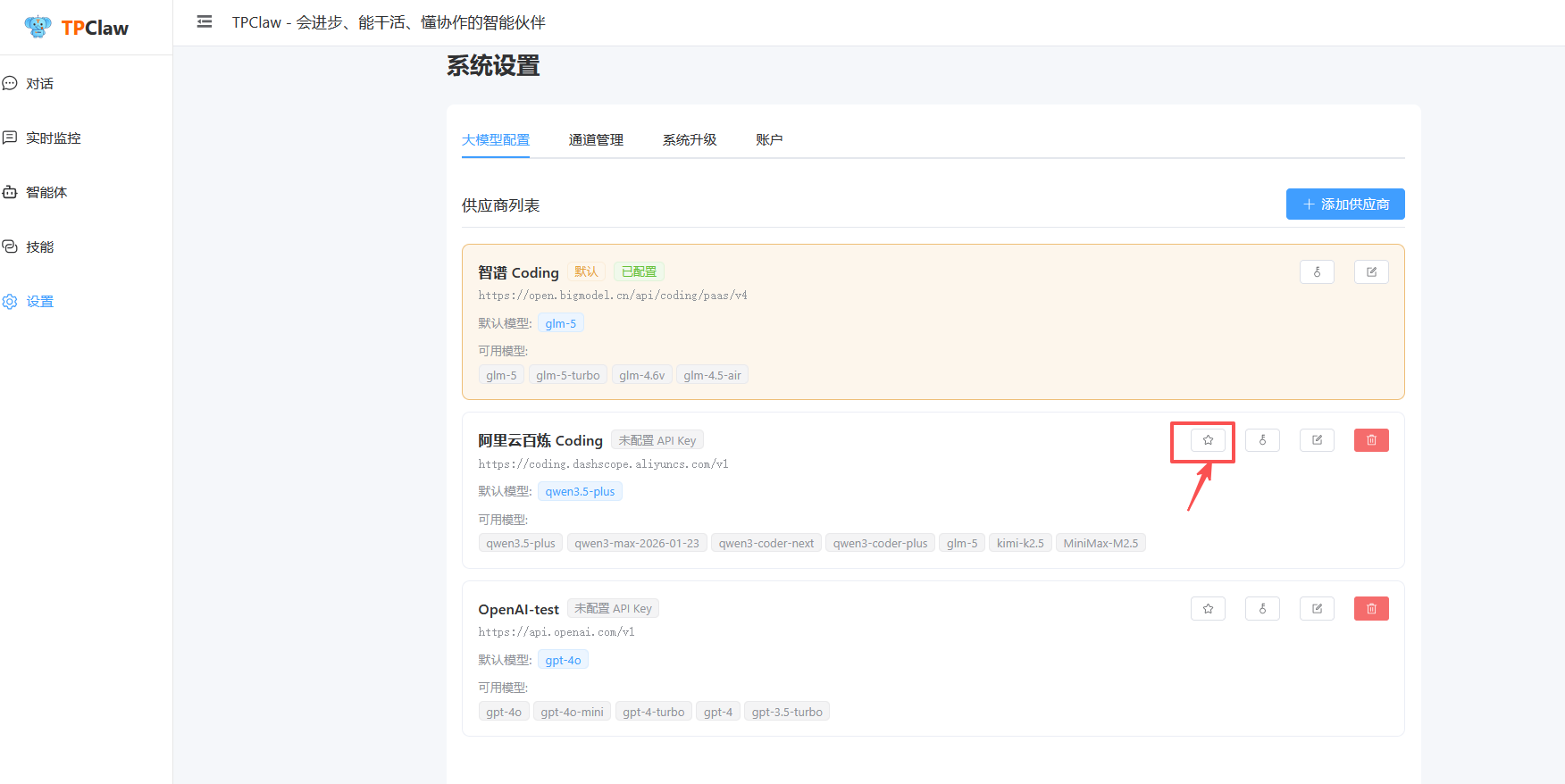
设为默认后:
- 卡片上会显示绿色的「默认」标签
- 主智能体将使用该供应商的模型
- 之前设置的默认供应商会自动取消
未配置 API Key 的供应商无法设为默认,请先点击编辑按钮配置 API Key。
支持的供应商
TpClaw 支持所有兼容 OpenAI API 协议的供应商,以下是常见的预设供应商:
| 供应商 | 类型 | 说明 |
|---|---|---|
| 智谱 AI | 云端 | GLM-5、GLM-4 系列 |
| 阿里云百炼 | 云端 | 通义千问系列 |
| OpenAI | 云端 | GPT-4、GPT-3.5 系列 |
| DeepSeek | 云端 | DeepSeek 系列 |
| Ollama | 本地 | 开源本地模型 |
| 自定义 | - | 任何兼容 OpenAI 协议的服务 |
接入自定义供应商
如果你的供应商不在预设列表中,只需满足以下条件即可接入:
- API 兼容 OpenAI Chat Completions 协议(
/v1/chat/completions) - 填写正确的 Base URL 和 API Key
例如接入 DeepSeek:
- 供应商 ID:
deepseek - Base URL:
https://api.deepseek.com/v1 - API Key:你的 DeepSeek API Key
模型参数
在供应商卡片中点击编辑按钮,可以展开配置模型参数:
| 参数 | 范围 | 说明 |
|---|---|---|
temperature | 0.0-2.0 | 采样温度,越高越随机 |
topP | 0.0-1.0 | 核采样参数 |
maxTokens | int | 最大输出长度 |
frequencyPenalty | 0.0-1.0 | 频率惩罚,防止重复 |
presencePenalty | 0.0-1.0 | 存在惩罚,鼓励新话题 |
模型高级属性
在模型列表中点击「设置」按钮,可展开模型的高级属性配置:
上下文窗口 (context_window)
模型的上下文窗口大小(token 数),用于:
/context命令显示上下文使用率:Token 数: 15680 / 262144 (6.0%)- 会话压缩阈值计算(基于上下文百分比触发压缩)
| 配置 | 说明 |
|---|---|
| 留空 | 使用系统内置默认值(已覆盖主流模型) |
| 手动填写 | 覆盖默认值,适合新模型或 Ollama 本地模型 |
模型能力 (capabilities)
标记模型支持的能力,影响系统行为:
| 能力 | 说明 | 影响 |
|---|---|---|
vision(图片理解) | 模型支持图片输入 | 禁用时,图片消息不会发给该模型 |
function_calling(工具调用) | 模型支持函数调用 | 几乎所有主流模型都支持,建议默认勾选 |
reasoning(推理) | 模型支持深度推理(如 o1 系列) | 启用时使用推理专用处理逻辑 |
TIP
- 选择预设模型时,系统会自动填充已知的上下文窗口和能力
- Ollama 本地模型建议手动填写上下文窗口大小
- 不填能力字段时,系统会默认假设支持所有能力(保守策略)
YAML 配置示例
yaml
models:
  providers:
    zhipu_coding:
      name: "智谱 Coding"
      base_url: "https://open.bigmodel.cn/api/coding/paas/v4"
      api_key: "${ZHIPU_API_KEY}"
      model: "glm-5"
      models:
        - name: "glm-5"
          context_window: 262144
          capabilities: ["function_calling"]
        - name: "glm-4.6v"
          context_window: 200000
          capabilities: ["vision", "function_calling"]
YAML 配置参考
除了通过控制台界面配置外,也可以直接编辑配置文件:
yaml
models:
  default: "default"                    # 默认供应商 ID
  providers:
    default:
      name: "智谱 Coding"
      base_url: "https://open.bigmodel.cn/api/coding/paas/v4"
      api_key: "${ZHIPU_API_KEY}"
      model: "glm-5"
      models:
        - name: "glm-5"
          alias: "default"
          context_window: 262144        # 上下文窗口大小(token 数)
          capabilities: ["function_calling"]
        - name: "glm-4.6v"
          context_window: 200000
          capabilities: ["vision", "function_calling"]
        - name: "glm-4-flash"

    openai:
      name: "OpenAI"
      base_url: "https://api.openai.com/v1"
      api_key: "${OPENAI_API_KEY}"
      model: "gpt-4"
      models:
        - name: "gpt-4"
          context_window: 8192
          capabilities: ["function_calling"]
        - name: "gpt-4-turbo"
          context_window: 128000
          capabilities: ["vision", "function_calling"]
        - name: "gpt-3.5-turbo"

    ollama:
      name: "Ollama 本地模型"
      base_url: "http://localhost:11434/v1"
      api_key: ""
      model: "llama2"
在智能体中引用
智能体配置中通过变量引用供应商:
json
{
  "url": "${global.models.providers.default.base_url}",
  "key": "${global.models.providers.default.api_key}",
  "model": "${global.models.providers.default.model}"
}